Inventory for small operations
Open it once a day, and know what needs ordering.
Crate does not greet you with charts. It greets you with the products that are about to run out, the orders still waiting to be filled, and nothing else. On a quiet day it tells you that too.
The demo is loaded with real-looking stock and opens without a sign-up.
Mixed Nuts 200g
SNK-001
34 of 50
Gel Pen 0.5mm, box of 12
STA-002
19 of 24
Microfiber Cloth, 5-pack
CLN-002
25 of 26
This is the top of the real opening screen. The amber number is the level you have, the grey one is the reorder point you set.
What you get out of it
Three things, and they are the ones you actually chase.
What you have, per location
Every product, in every bin, as a number that comes from the movements rather than from a field somebody last touched in March.
What is about to run out
Set a reorder point once. The opening screen names the products that crossed it, and raises the purchase orders from the same place.
Where a number came from
Search the history by product, SKU, reason or reference and read the line that caused the change, with the date and the person on it.
The history
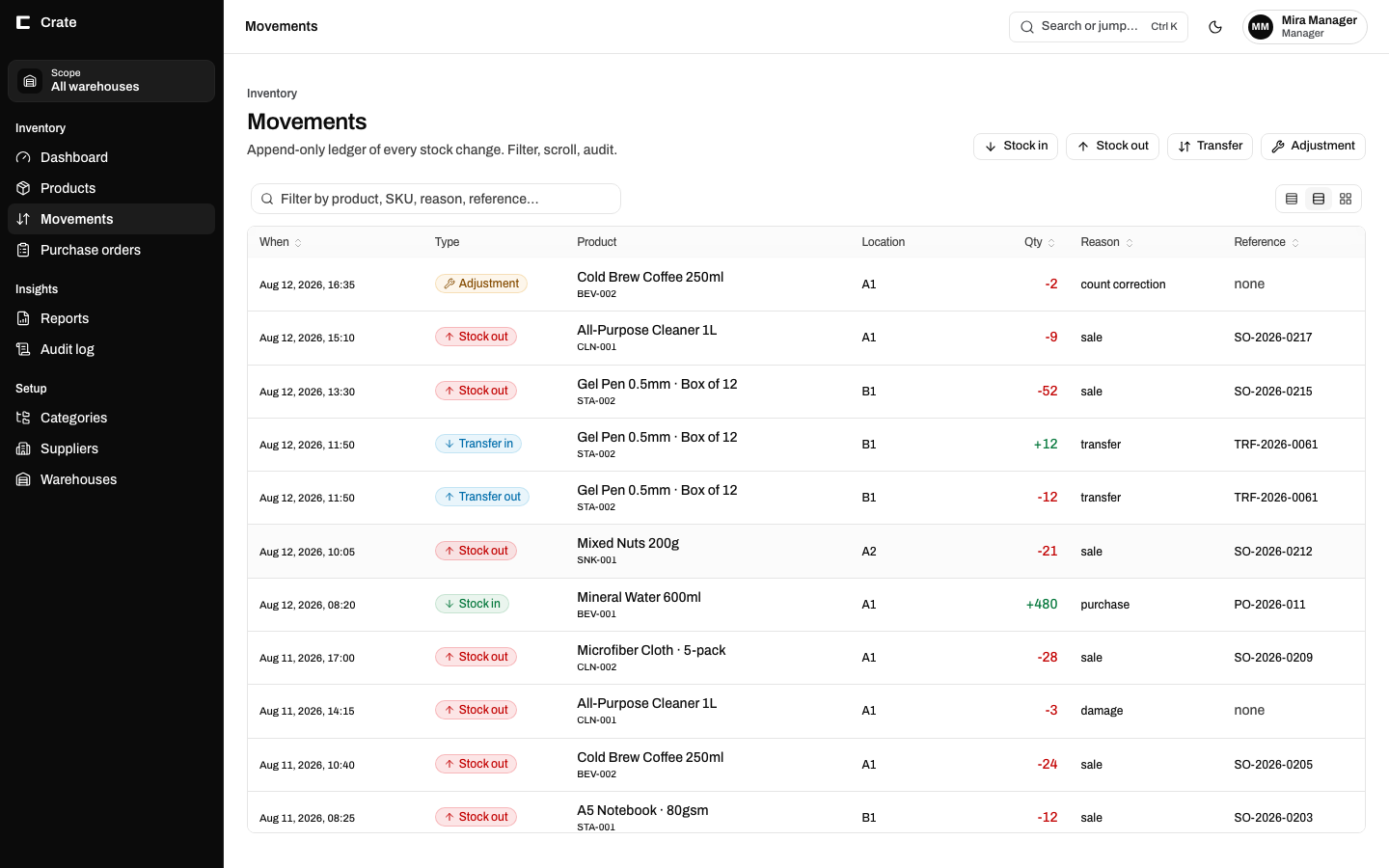
Type anything on the row and find it.
Product name, SKU, a reason like count correction, a sales order number, a bin. The filter searches the line, not just the title, so the thing you half remember is enough to find it.
Absolute dates, never "3 days ago"
Because in three months the year matters and a relative time has thrown it away.
Transfers travel in pairs
Out of one bin and into another, written together in one go, sharing a reference.
Nothing is overwritten
A correction is a new line. The one it fixes stays put, so the pair reads as an explanation.
Ordering
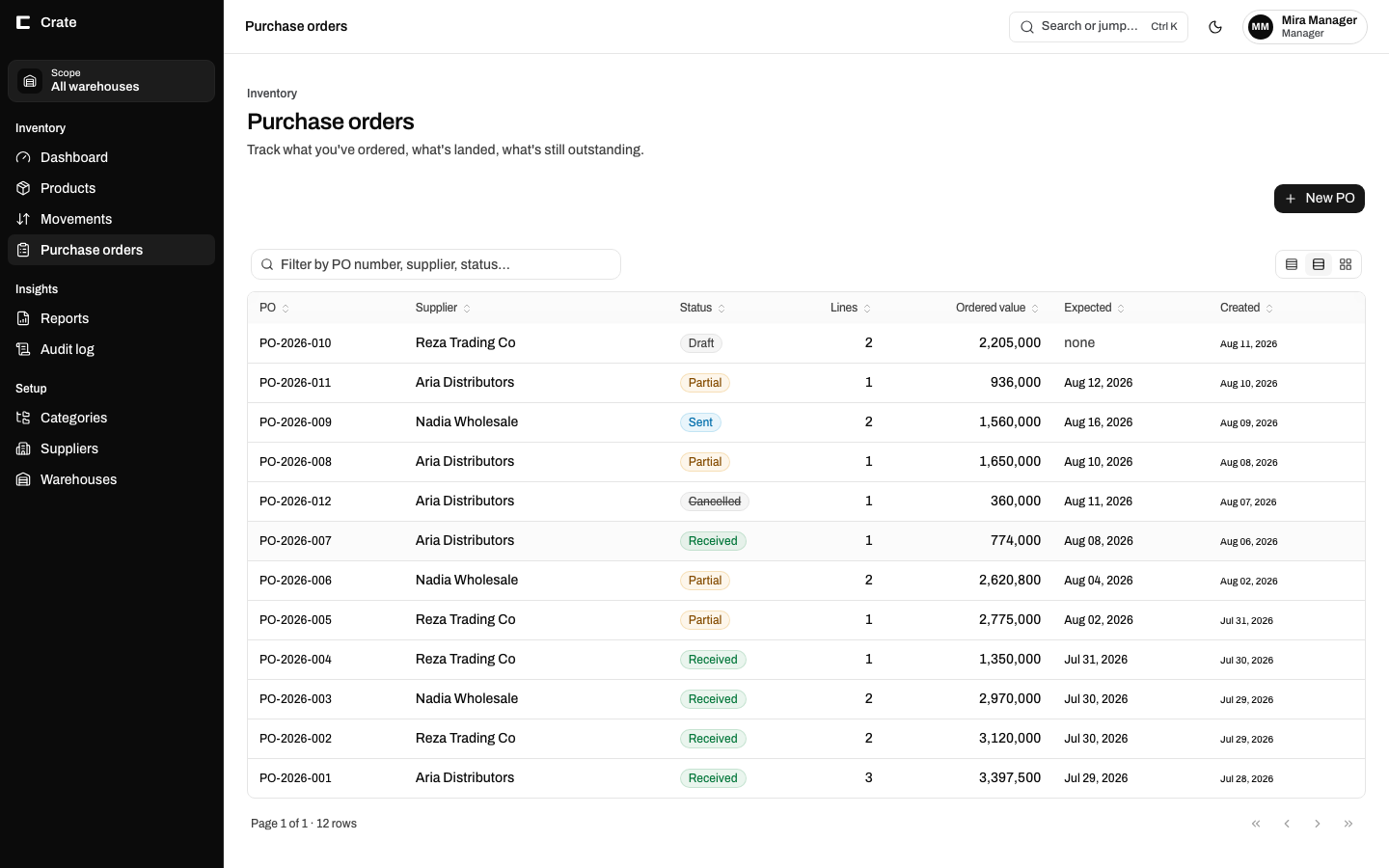
An order stays open until it is actually filled.
Forty of the sixty arrive. The order does not close and leave you to remember the other twenty; it sits at partial with the outstanding quantity on the line, and cost updates as stock lands.
Draft, sent, partial, received, cancelled
Five states, because the fourth one is where the money goes missing.
Weighted-average cost, automatic
Recalculated on every receipt, so margin is not a separate spreadsheet.
Suppliers and expected dates
What was promised against what turned up, on the same row.
Getting started
Your spreadsheet becomes the opening balance.
There is no import ceremony and no month of parallel running. You start on a Tuesday with what you have.
01
List the products
Name, SKU, unit, and the reorder point you want to be warned at. Suppliers and categories if you use them.
02
Enter today's count
One stock-in movement per product, carrying the number you counted. That line becomes the beginning of the history.
03
Record as you go
Sales out, deliveries in, transfers between bins. From then on the count is never typed again, it is added up.
Before you ask
Questions worth answering honestly.
Can I sign up and start using it today?
Not yet, and it would be unfair to pretend otherwise. The system runs and the demo is real, but separate company accounts are still being built, so today everyone would share one set of data. Early access is a short list of people who get an account the week that lands.
What does it cost?
Nothing is being charged yet, because nothing can be: there is no billing in the product. Pricing will be decided before the first account opens, and anyone on the early access list will see it before they are asked for anything.
How many products and locations does it handle?
It is built for hundreds of products across a handful of locations, which is the size where a spreadsheet has started to hurt. It is not a warehouse management system and does not pretend to be.
Does it do barcodes?
Products carry a barcode field and it is searchable. Scanning hardware is not wired up yet, so today a scanner that types acts like a keyboard, which works for lookups but is not a picking workflow.
Who can see and change what?
Two roles, manager and staff, enforced in the database rather than only in the screens. Every change is written to an audit log that the application itself cannot edit.
Early access
Look at it first. It asks nothing of you.
Open the demo, set a reorder point, receive half a purchase order, and see whether the screen tells you what you would want to be told. If it does, leave an address and you will hear once, when accounts open.
One message when accounts open. Nothing else, ever.